Tổng hợp Prompt làm nét, khôi phục ảnh
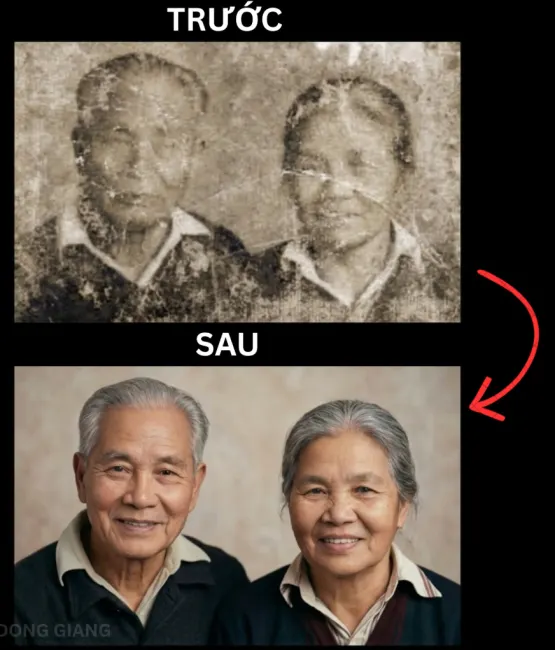
KHO TÀNG "THẦN CHÚ" (PROMPT) COPY LÀ DÙNG NGAY:
Dưới đây là 10 câu lệnh mình đã soạn sẵn cho từng trường hợp, bạn chỉ việc chọn đúng bệnh của ảnh và copy thôi:
1. 🛠️ Cứu ảnh cũ, hỏng (Dùng cho mọi trường hợp chung)
> Restore this damaged vintage photo to high resolution, remove all scratches, dust, cracks, tears, creases, folds, stains and water damage, seamless repair, match original texture, lighting, skin tones and film grain perfectly, recover fine details especially face, eyes, hair and clothing, enhance sharpness and clarity naturally, photorealistic, natural skin texture, preserve exact facial identity and original character, no artifacts, 8K quality
2. ☀️ Sửa ảnh bị Chói sáng / Cháy sáng
> Fix severe overexposure in this photo, recover blown-out highlights and lost details in bright areas, reduce highlights naturally while preserving skin tones and sky details, balance lighting perfectly, lift shadows slightly to match, enhance clarity and sharpness, seamless repair, photorealistic natural look, match surrounding lighting and colors, high resolution, no artifacts
3. 🏃 Sửa ảnh bị Rung tay / Mờ nhòe
> Remove motion blur and camera shake from this image, deblur the entire photo especially the face, eyes and main subject, sharpen fine details, recover original sharpness and clarity, enhance facial features naturally, match original lighting and colors, photorealistic, natural skin texture, preserve identity, ultra sharp 8K quality, no artifacts or ghosting
4. 🌑 Sửa ảnh Thiếu sáng / Tối om
> Lift deep shadows and recover hidden details in dark areas of this photo, brighten underexposed regions naturally without noise or color shift, balance overall exposure, enhance contrast and clarity especially on face and subject, match original lighting and skin tones, photorealistic, seamless repair, natural look, high resolution, no artifacts
5. 🌫️ Khử Nhiễu / Ảnh bị hột (Noise)
> Denoise this photo completely, remove heavy digital noise and film grain while preserving natural texture and fine details, sharpen face, eyes and important elements, enhance clarity and sharpness, keep original skin tones and colors authentic, photorealistic restoration, no over-smoothing, 8K quality
6. 🚑 Ảnh cũ nát nặng (Rách to, mất nét)
> Professional ultra-realistic restoration of this severely damaged old photo: reconstruct missing parts, repair large tears, cracks and missing areas seamlessly, recover faces, bodies, clothing and background details from surrounding clues, enhance sharpness and clarity dramatically, restore natural colors and skin tones, preserve authentic vintage character and film grain, match original lighting perfectly, photorealistic 8K, preserve exact facial identity, no artifacts or AI look
7. 🎨 Tô màu ảnh đen trắng
> Colorize this black and white / faded photo with natural, historically accurate colors, restore vibrant yet realistic skin tones, clothing, hair, eyes and background, remove yellowing and color cast, enhance sharpness and fine details, match original lighting and mood, photorealistic, natural look, preserve facial identity and vintage character, 8K quality, seamless
8. 🏥 Combo tổng hợp (Sửa nhiều lỗi cùng lúc)
> Full professional restoration of this damaged old photo: remove all scratches, dust, cracks, tears, creases, stains; fix motion blur, overexposure and underexposure; recover lost details in faces, eyes, hair, clothing and background; enhance sharpness, clarity and fine details; restore natural colors and remove color cast; seamless repair, match original texture, lighting, skin tones and film grain perfectly; photorealistic, natural skin texture, preserve exact facial identity and vintage character, 8K ultra sharp, no artifacts
9. 👱♀️ Chỉ làm nét khuôn mặt (Face Restoration)
> Ultra-realistic face restoration only: sharpen eyes, iris details, eyelashes, lips and skin texture, recover facial identity perfectly, natural skin pores and subtle details, match surrounding lighting and skin tone exactly, photorealistic, no plastic or AI look, high resolution
10. 🔍 Tăng độ nét tối đa (Upscale 8K)
> Upscale this restored photo to 8K with maximum detail enhancement, sharpen all fine details especially face and textures, enhance clarity and depth natura